Zero decision fatigue · Now on iOS and Android

Show up.
It's already planned.

Tell Fit Snap your goal, your gear, and your week once. It builds today's session and today's plate, and rebuilds them when life changes.

  • Today's workout · ready
  • Next meal · set
  • Recovery · optional health sync
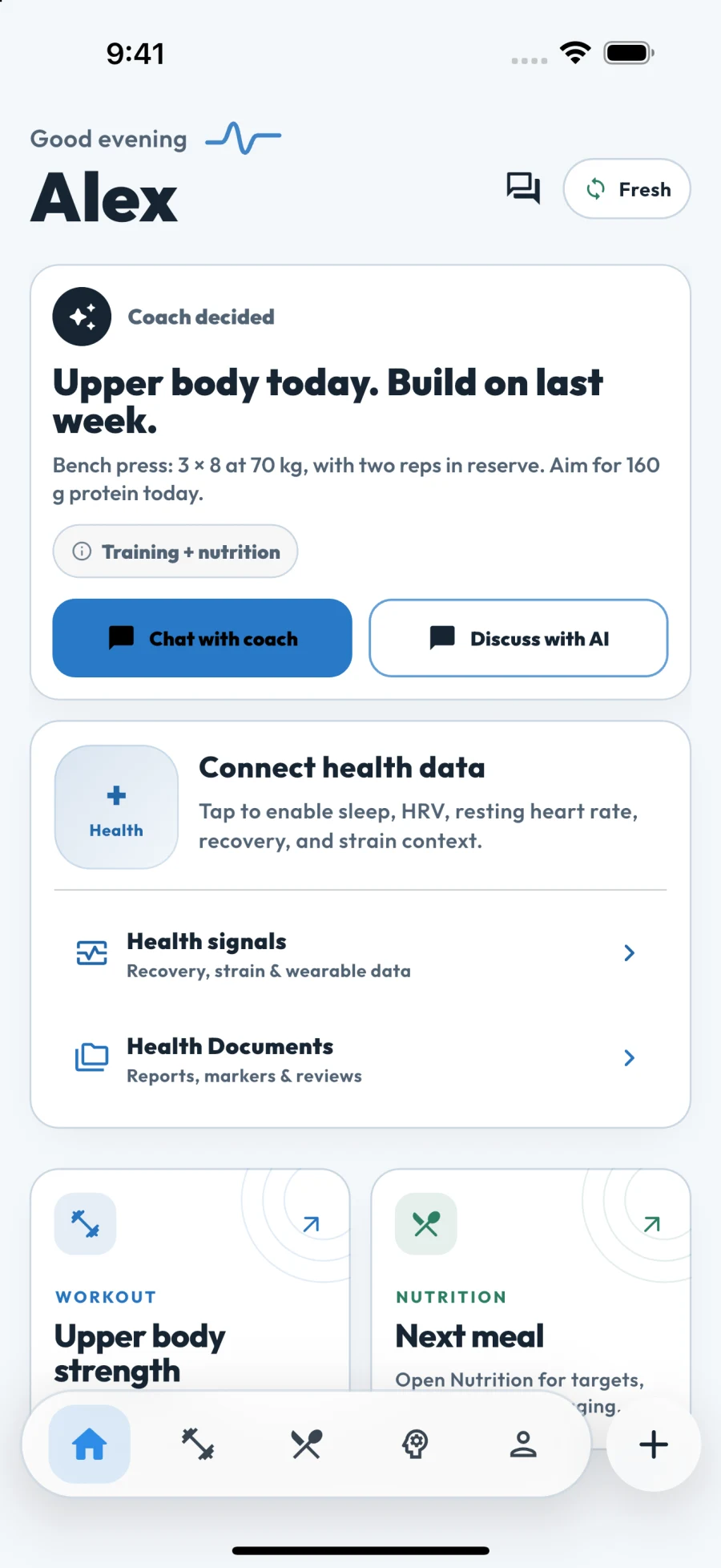
Real app screenToday, when you open it
Fit Snap home showing a daily coach decision, workout and nutrition

Inside the app

The plan. The work.
The bigger picture.

Training, nutrition and progress belong together. Explore the tools behind your day, through real app screens.

01 / Training

A clear plan. Every set accounted for.

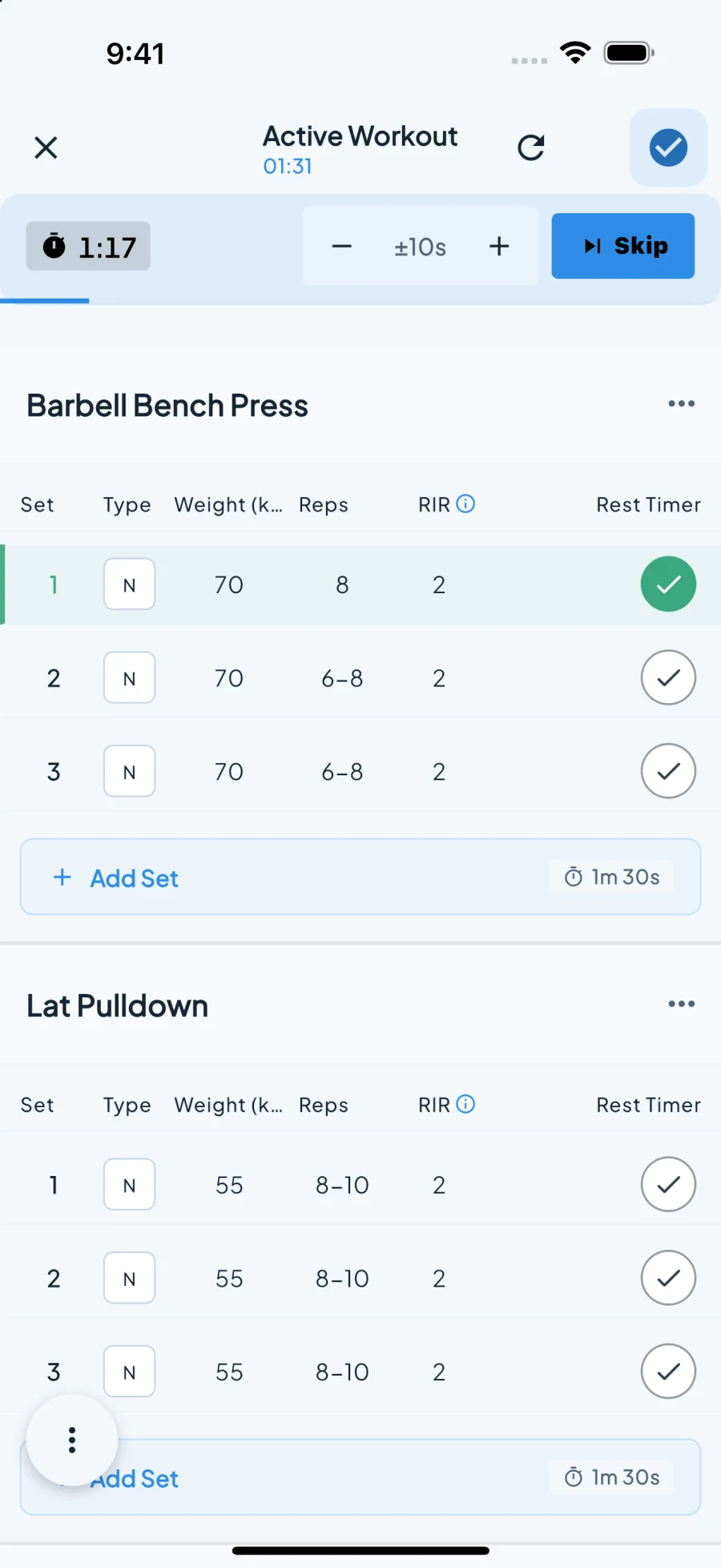
Build around your goal, equipment and schedule. Then log the work: sets, reps, load, effort and rest, all in the same session.

  • Personalized plans and exercise swaps
  • Set logging, rest timers and supersets
  • Exercise library and manual workout editing
Get Fit Snap
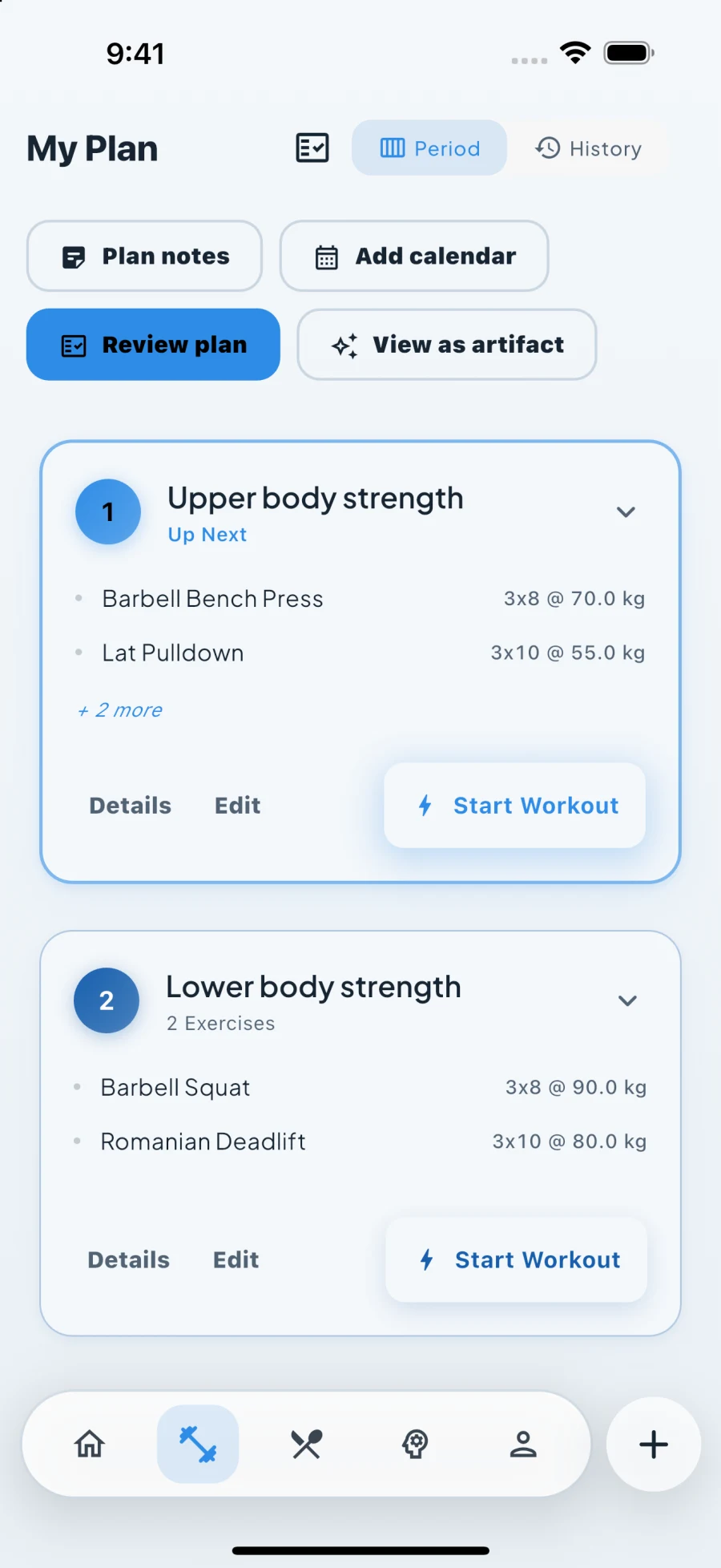
Fit Snap workout plan showing exercises, sets and rest intervals
Plan the session. Start when you’re ready.

02 / Nutrition

Fuel the goal. See the whole day.

Keep meals, calories and macros together. Go beyond protein totals with micronutrient targets, and track fasting when it fits your routine.

  • Meal plans and daily macro targets
  • Food logging, with photo and voice entry
  • Micronutrient progress and fasting tracking
Get Fit Snap
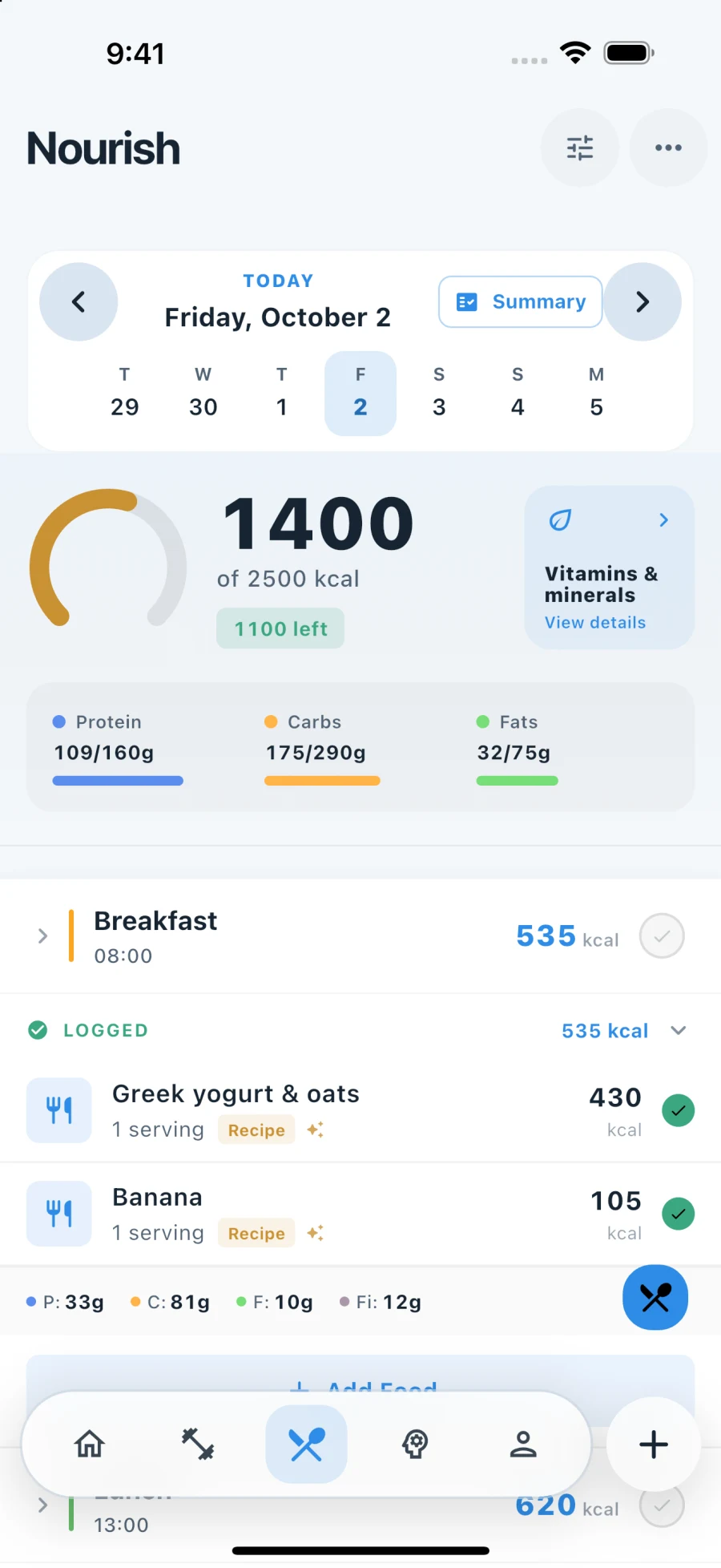
Fit Snap nutrition dashboard with calories, macros and logged meals
Your targets and meals, in one view.

03 / AI coach

Tell it what changed. Work out the next move.

Ask about a lift, a meal, a missed week or a change of plans. Your coach can use your goals and logged history to give you a concrete next step.

  • Conversations about training and nutrition
  • Guidance around time, equipment and recovery
  • Daily coaching with decisions you can act on
Get Fit Snap
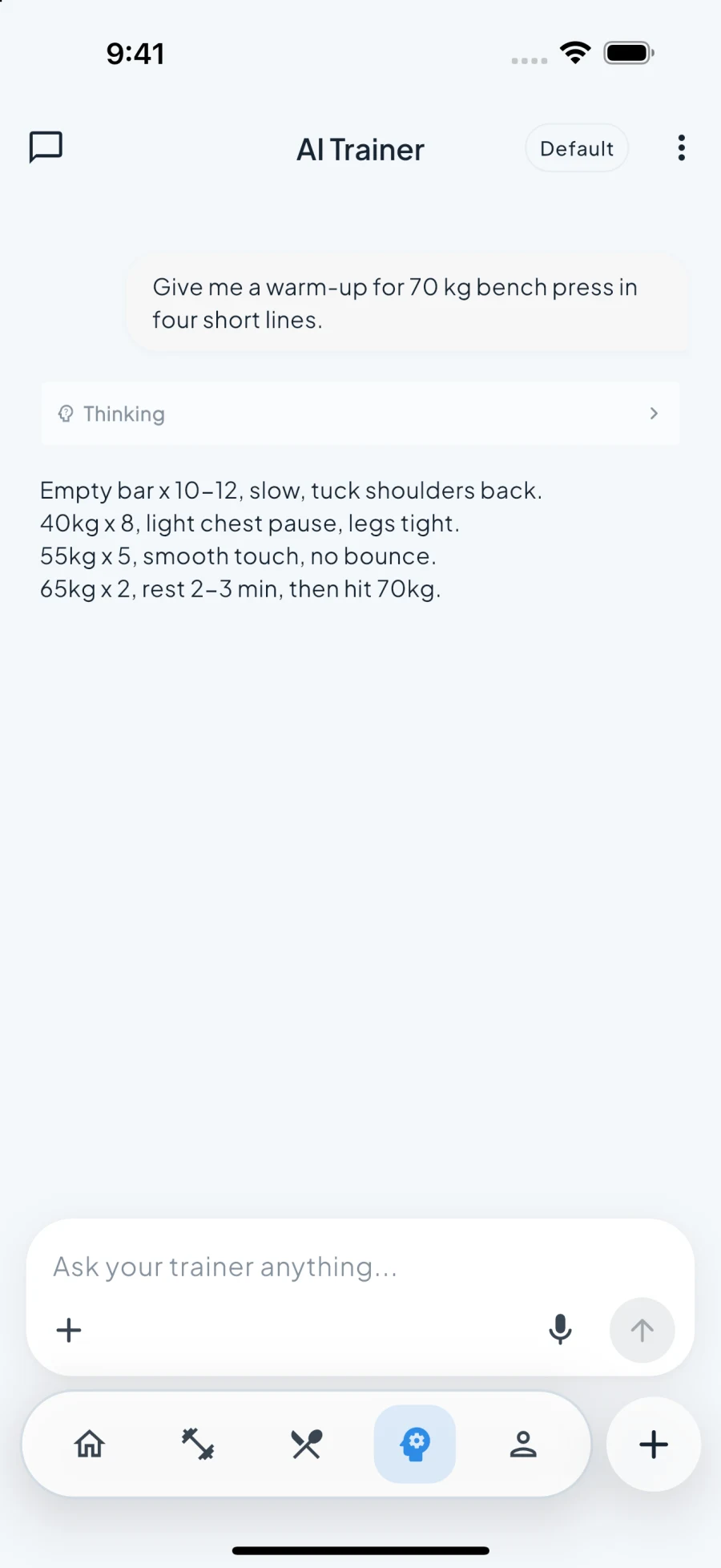
A real Fit Snap coach conversation with a bench press warm-up recommendation
An actual coach reply to a fictional test profile.

04 / Progress

See what the work is building.

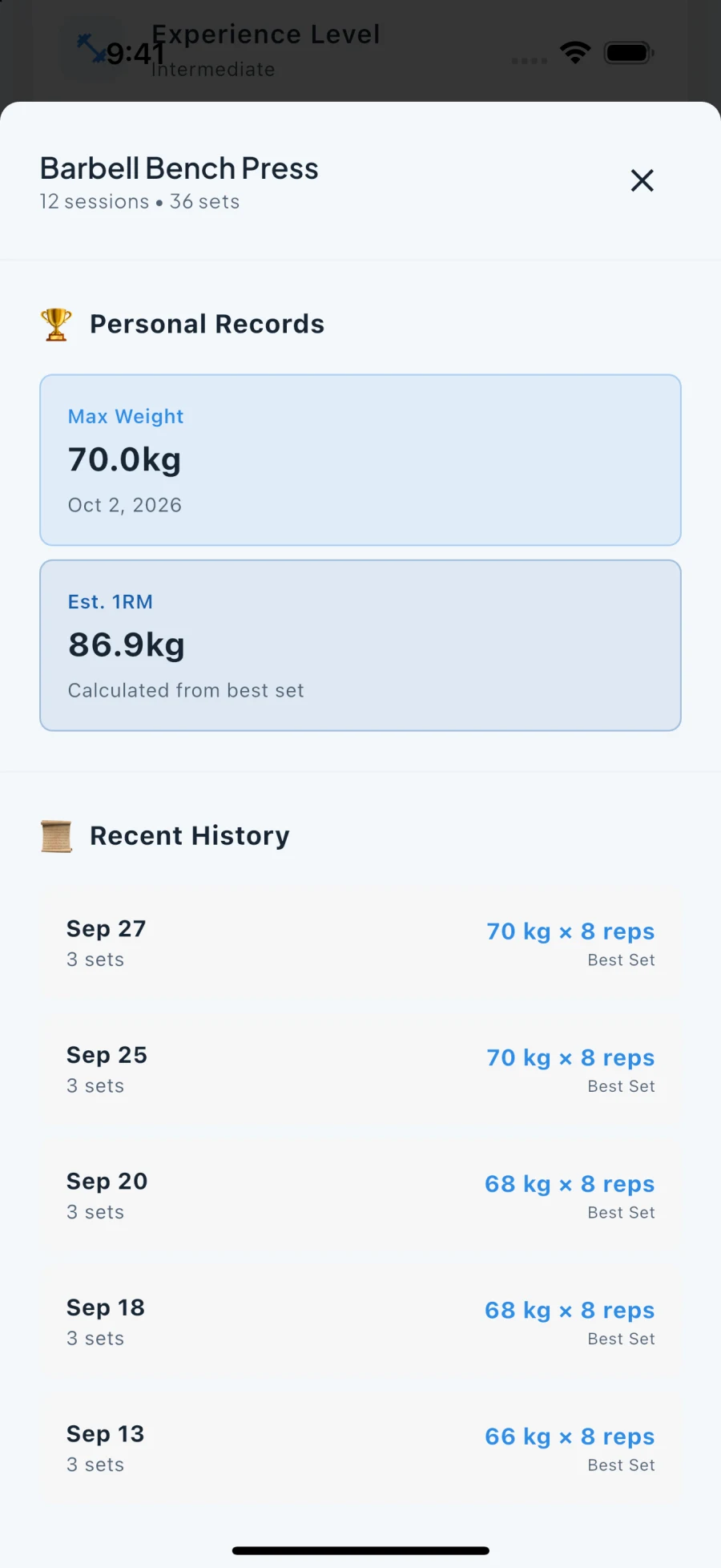
Look back at your sessions, strength records and body measurements. Bring your workout history with you instead of starting your training story from zero.

  • Strength progression and personal records
  • Weight trends and body measurements
  • Workout history and CSV imports
Get Fit Snap
Fit Snap strength progression showing training history and records
Progress measured against your own history.

05 / Health context

Keep the context beside the plan.

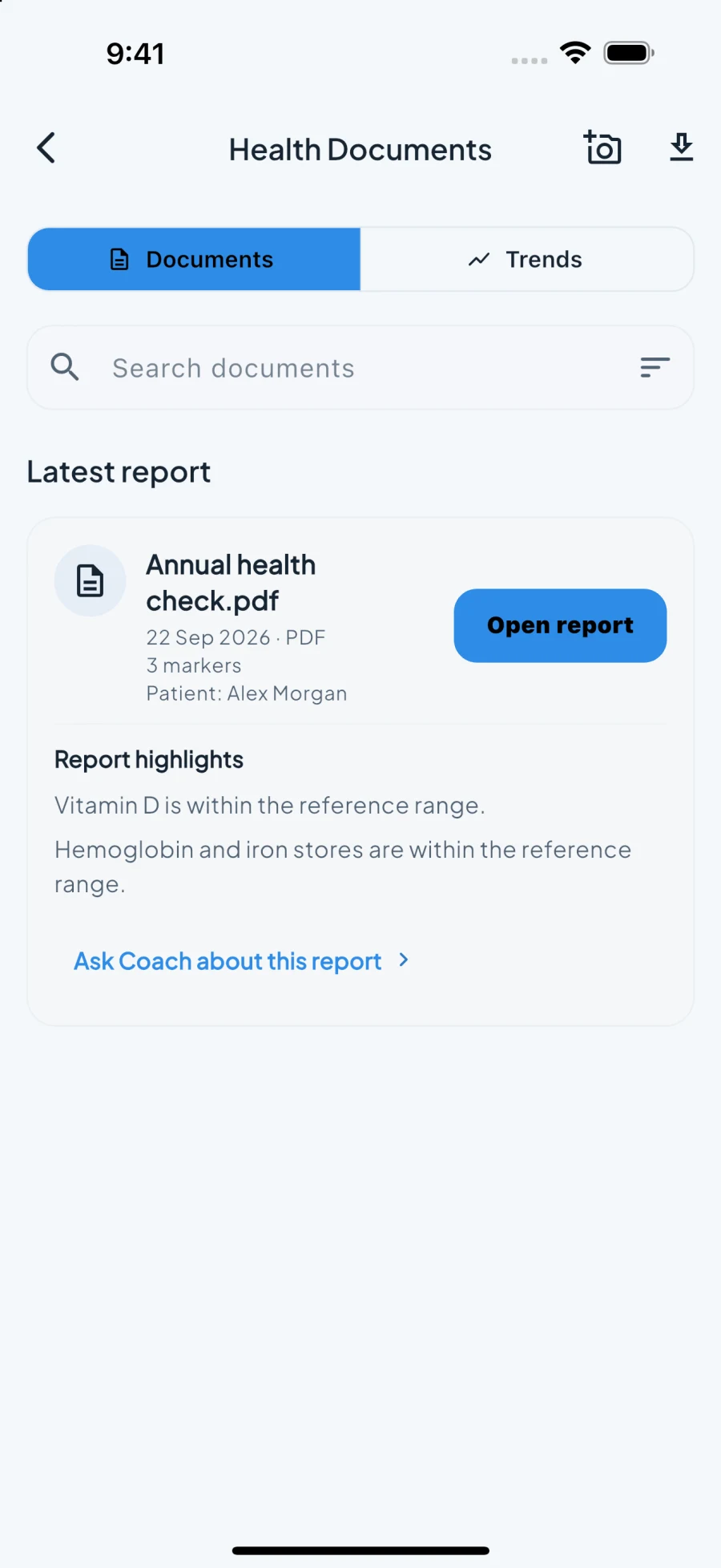
Organize health reports and marker trends alongside your fitness data. Connect supported health services for sleep, heart-rate and recovery context.

  • Health documents, report details and markers
  • Apple Health and Android Health Connect
  • Recovery context for conversations with your coach
Get Fit Snap
Fit Snap health report list with marker summaries and report dates
Fitness context. Medical decisions stay with your clinician.

06 / Cycle tracking

Your cycle is part of the picture.

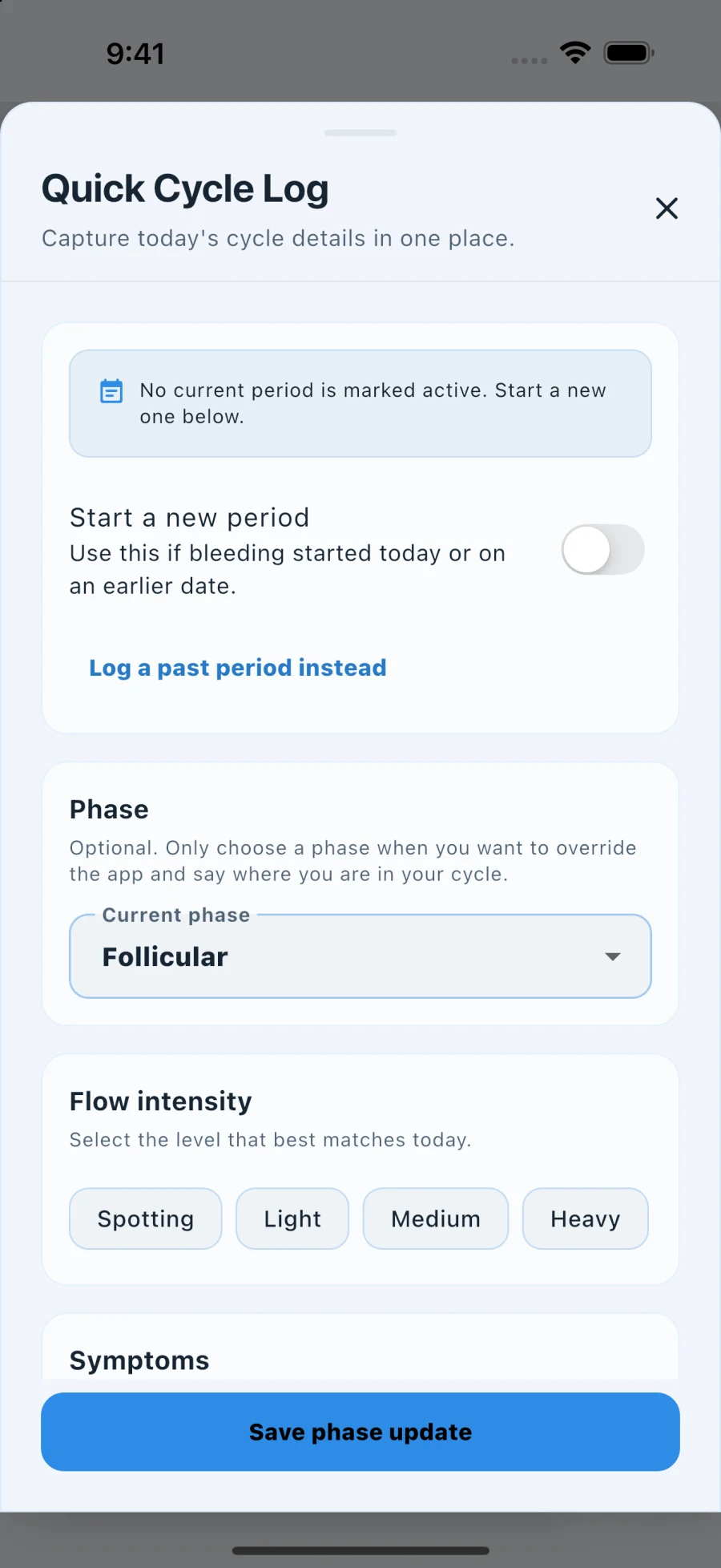
Log cycle dates, flow and symptoms when you choose. Give your coach useful context about how you feel, alongside the training you’ve already done.

  • Optional cycle and symptom logging
  • Phase context alongside your health data
  • Coaching that can account for your cycle
Get Fit Snap
Fit Snap optional cycle log with flow and symptom controls
Turn it on when you want it. Your choice.

Also built in

  • Manual tracking
  • Accountability sharing
  • Workout CSV import
  • Exercise customization
  • Four app themes
  • Apple Watch companion

A day with Fit Snap

Nothing to figure out.
Just today.

You don't build a program. You don't pick exercises. You don't do maths between sets. Here is what a day actually looks like.

  1. 07:00

    Open the app

    Start with your coach’s next step and today’s workout. Connect supported health data when you want sleep and recovery context alongside the plan.

    Fit Snap daily home with a coach decision, workout and nutrition entry points
  2. 07:40

    Tap start

    Exercises, sets, rest, and time are set for the gear you have. Change anything if you want. Or don’t.

    Fit Snap workout plan showing exercises, sets, rest and a start button
  3. 08:15

    Lift and log

    Rest timers run themselves. You enter weight and reps. That is the whole job.

    Fit Snap active workout with a logged set and rest timer
  4. 12:30

    Eat to target

    Macros come from your goal and this morning’s session. Log the meal, and the day’s targets update. No calculator.

    Fit Snap nutrition dashboard showing daily calories, macros and logged meals
  5. 22:00

    Review the work

    Your logged sets become training history and strength trends. See what’s improving, then work with your coach on the next step.

    Fit Snap strength progression with training history and records

Setup is a conversation, not a spreadsheet

Say it once,
in plain words.

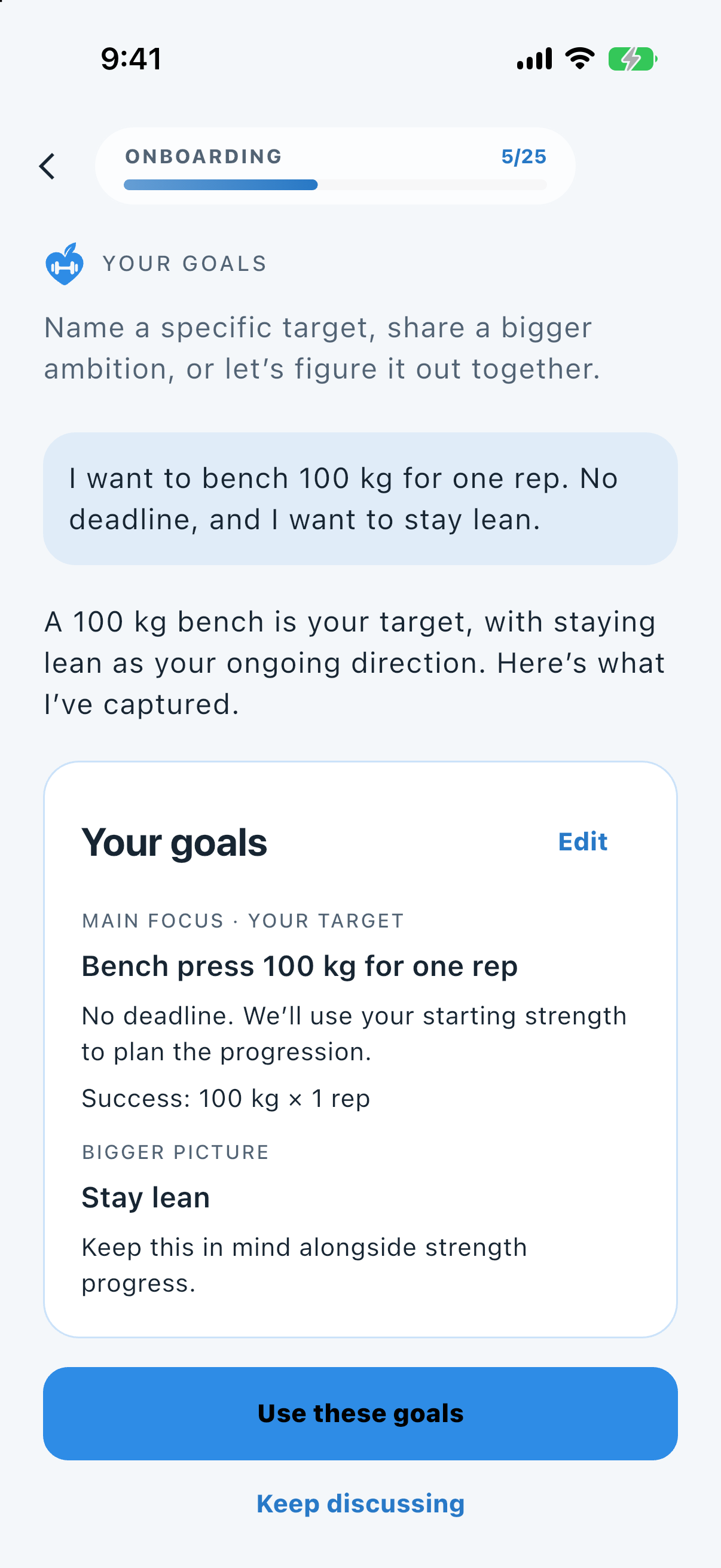
Type your goal the way you'd tell a friend. Fit Snap turns it into a target, a progression, and a nutrition phase, then gets out of the way.

Bench 100 kgFirst marathonLose 5 kgJust get strongerNot sure yet

Not sure what your goal is? Say that. It asks a few questions and picks a sensible starting point.

Real app screenGoal setup
Fit Snap goal setup turning a typed sentence into a 100 kilogram bench press target and a stay-lean priority

Built for real weeks

Life happens.
It's replanned.

Bench taken? Twenty minutes? Hotel room with two dumbbells? Four hours of sleep? Tell it what changed. It rebuilds the session and keeps the progression intact.

See it think

Verbatim replies from the production coach to test profiles. Not written by hand.

Cycle-aware, real reply

You

Woke up with really bad cramps, first day of my period, and I feel drained. HIIT is on the plan this morning. What should I do?

Fit Snap

Priya, sorry you're dealing with that on day 1 — let's dial today *down*, not skip, per your rule to adjust on heavy symptom days.

Your plan this morning is HIIT conditioning with kettlebell swings, burpees, box jumps, and rower — all high-impact / high-pressure moves that are the worst mix for bad cramps and feeling drained.

Here's what I'd do:

Swap HIIT for a low-intensity movement session, 25-30 min in the gym morning slot:

  • 10-15 min easy rower or walk - conversational pace, RPE 3-4/10, no intervals
  • Then gentle mobility: cat-cow, hip flexor stretch, thoracic openers, slow bodyweight squats, glute bridges - 10 min
  • Stop the burpees and box jumps completely today - jumping + cramping rarely goes well
  • Skip kettlebell swings today unless cramps ease a lot with the easy warm-up

If even that feels like too much when you start, it's fine to make it just a 15-20 min walk + stretch. Keeping the morning habit matters more than pushing intensity.

This won't hurt your squat 80kg x 5 goal — one adjusted conditioning day preserves recovery for your next lower strength days.

A couple quick checks:

  1. Do you feel okay to try that gentle version, or are you dizzy, nauseous, or in too much pain to move at all?
  2. Does light walking usually ease your cramps a bit, or make them worse?

Rest, hydrate, heat if that helps you, and let pain be the guide — if cramps spike, get sharp, or you feel faint, stop and rest today and tell me, we'll shift HIIT to later in the week.

Want me to officially lighten today's workout in your plan to that recovery version?
Read the whole exchange

Coming back, real reply

You

Then I should do two sessions a day this week to recover the lost time.

Fit Snap

No—don’t do two sessions a day. You haven’t lost time to make up, and doubling training after a crash could trigger another one.

This week, use one light session only, up to 10–15 minutes:

  • Easy walking or your clinician-approved movements
  • Keep effort very easy
  • After each set, complete the count-to-ten-in-one-breath check
  • Stop for joint pain, worsening fatigue, or if the check fails
  • Take a full rest day if symptoms flare

Your goal is stable energy, not fitness gains. Follow up with your neurologist about the medication interruption before increasing activity.

Read the whole exchange
All examples: travel, long shifts, coming back, restraint

Or tell it what changed yourself.

  • You say

    “Hotel gym. Dumbbells only. 40 minutes.”

    Fit Snap does

    Rebuilt as a dumbbell session. 38 minutes. Same muscles.

  • You say

    “Only have 20 minutes today.”

    Fit Snap does

    Compressed into a 20-minute circuit. Progression kept.

  • You say

    “Slept four hours. Feeling wrecked.”

    Fit Snap does

    Intensity lowered for today. Volume stays on track.

Sleep, HRV, and resting heart rate come from Apple Health or Health Connect when you connect them. Without a wearable, it plans from what you log and what you tell it.

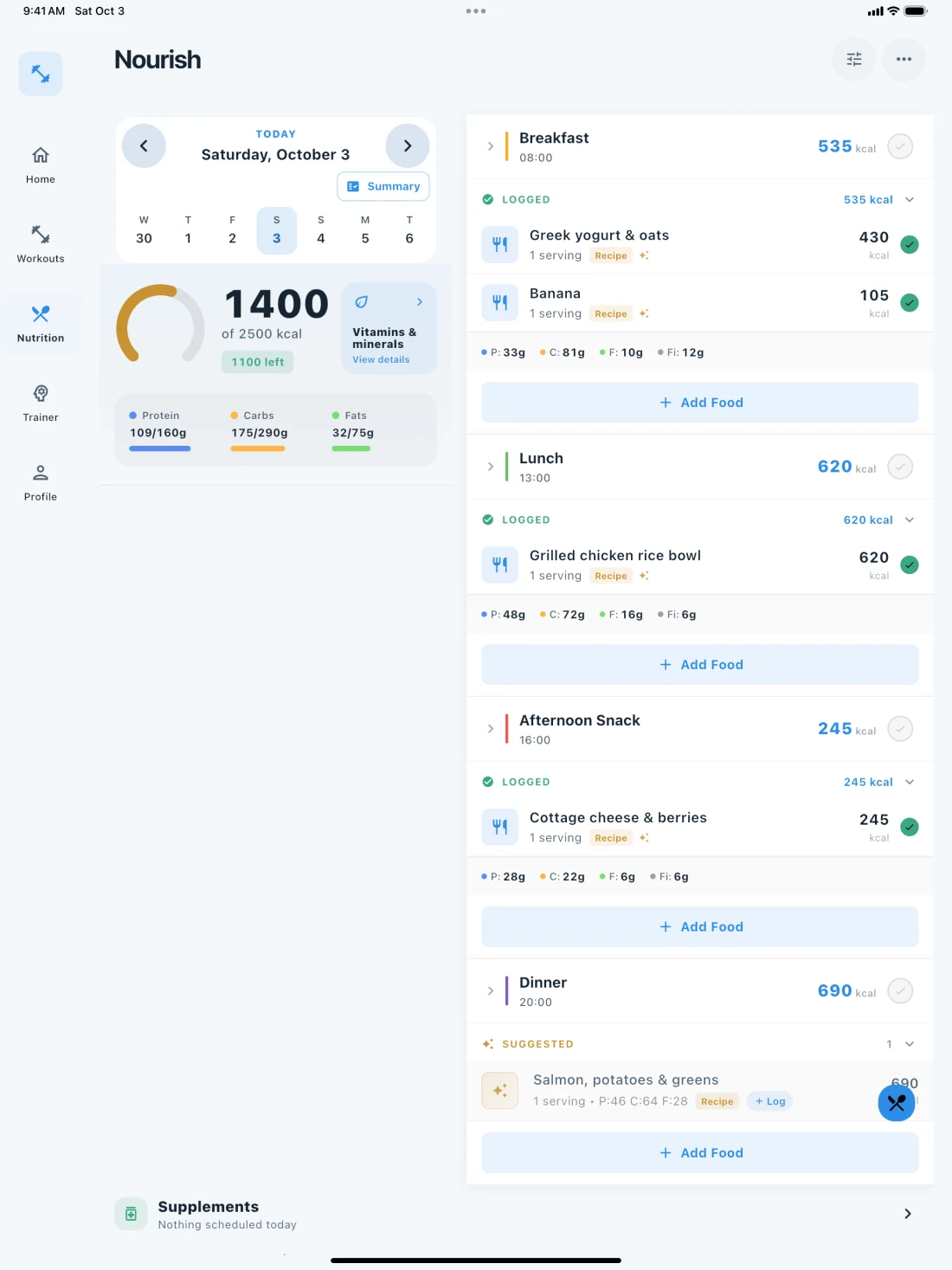
Real app screenMeals and macros
Fit Snap daily nutrition targets, macros and logged meals

The other half

Your plate is
planned too.

Macros come from your goal and your training, not from a calculator you have to remember to open. Log meals, and the targets stay in step with what you're training for.

  • Targets set from your goal and body stats
  • Choose a nutrition approach for your goal
  • Log a meal in seconds, not a spreadsheet row
  • Disagree? Say so. It adjusts.

Fit Snap on iPad

Same focus.
More room.

See the daily targets beside your meals. Keep the workout plan in view while you inspect a session. Read reports and coach conversations with space to think.

Get it for iPhone and iPad
Fit Snap iPad nutrition screen with daily targets on the left and logged meals on the right
Real app screen · fictional demo data

Questions

Before you start.

Can I just track my workouts?

Yes. Use manual workout and food logging, bring in workout history through CSV, and use the AI coach when you want more direction.

Do I need a wearable?

No. Fit Snap can work with your goals, logged training and what you tell it. Connecting Apple Health or Android Health Connect adds supported health and recovery context.

Can I use it on iPad?

Yes. The iOS app supports iPhone and iPad. Workout plans, nutrition, reports and coach conversations are available in the same app.

Do I have to plan anything?

No. You answer a short setup once. After that, every day has a workout and nutrition targets ready when you open the app.

Can I change what it gives me?

Always. Swap an exercise, shorten a session, edit a set, or tell the coach what changed. It replans around you, and you can override anything by hand.

What if I don't know my goal yet?

Say so. Fit Snap asks a few questions and starts you with a sensible default you can change at any time.

Do I need a gym?

No. Tell it what you have: a full gym, a pair of dumbbells, bands, or nothing at all. It plans with that.

Is the nutrition guidance medical advice?

No. Fit Snap gives training and nutrition guidance, not medical advice, diagnosis, or treatment. Talk to a professional about medical conditions.

Can I change how the app looks?

Yes. Four in-app looks: Frost, Bloom, Command, and Blaze. Your plan and your data stay the same.

Set up once. Show up tomorrow.

Stop planning workouts.
Start doing them.